idle · walk · run · jump · attack → PNG + JSON + XML
AI Sprite Sheet Generator
An AI sprite generator for 2D games: upload one character image or describe it, pick the animations you need, and get a transparent sprite sheet with a JSON or XML atlas, ready for Unity, Godot, Phaser and GameMaker. Free to try: the 7 credits you get when you sign up make one character and one animation, and the PNG, JSON and XML downloads are included.
1. Your character
2. Pick animations
Examples from the AI sprite sheet generator
Real results, playing frame by frame from the exported sprite sheet. Each one started from a single character picture. Open a sheet to check the frames yourself.
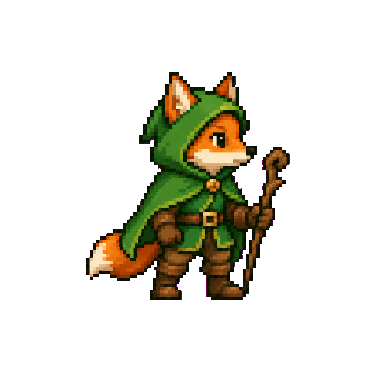 Fox adventurer · walk8 frames · 185×197 · 10 fpsDescribed: “a small fox adventurer with a green hooded cloak, brown leather boots and a short wooden staff”, pixel artOpen the sprite sheet
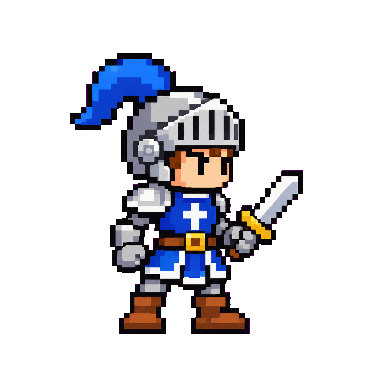 Knight · walk8 frames · 182×244 · 10 fpsCharacter image of a pixel-art knight with a swordOpen the sprite sheetKnight · attack8 frames · 268×238 · 12 fpsThe same knight, attack actionOpen the sprite sheet
AI sprite generator from an image
Upload a picture of your character: pixel art, a hand drawing, a 3D render or concept art. The AI sprite sheet generator redraws it as a game sprite (full body, side view facing right, on a flat background) and shows it to you before anything is animated. Every animation then starts from that same picture, so your character looks the same in every frame and every action.
Describe a character, get a sprite
No art yet? Describe the character in a sentence, such as “a small knight with a silver helmet, blue plume and a short sword”, and pick pixel art, cartoon or anime. The AI sprite maker draws it as a ready-to-animate game character.
AI sprite animations: idle, walk, run, jump and attack
Pick as many animations as you need for one character. The AI sprite sheet generator animates it, then we cut the clip into frames, remove the background and line the frames up in one sprite sheet.
- Idle · 6 frames at 8 FPS · looping cycle
- Walk · 8 frames at 10 FPS · looping cycle
- Run · 8 frames at 12 FPS · looping cycle
- Jump · 8 frames at 12 FPS · one move, back to the start pose
- Attack · 8 frames at 12 FPS · one move, back to the start pose
Pixel art, cartoon or anime sprites
In the AI sprite sheet generator, pixel art keeps hard pixel edges all the way to the export. Cartoon and anime styles suit hand-drawn 2D games. Uploaded characters keep their own style.
PNG sprite sheet with JSON and XML for Unity, Godot, GameMaker, Phaser and FNF
Every animation downloads as a transparent 2D sprite sheet (PNG) with every frame the same size in one row, so there is nothing to assemble or slice by hand. It comes with a JSON atlas (TexturePacker JSON hash) and a Sparrow XML atlas for Friday Night Funkin’ and HaxeFlixel. Drop them into your engine as they are, or slice by the frame size shown next to each animation.
Free to try, no subscription needed
Sign up and get 7 free credits: one character (2 credits) and one animation (5 credits), downloads included. After that the AI sprite sheet generator charges per animation. Buy a credit pack once, from $4.99 for 150 credits: pack credits never expire and you don’t need a plan. Monthly plans from $11.99 cost less per animation if you make a lot. Downloading the PNG, JSON and XML never costs extra; see pricing. If a generation fails, its credits come back automatically.
Free sprite sheet tools
Already have frames and don’t need the AI sprite sheet generator? These tools are free, need no account and run in your browser:
Questions
Is the AI sprite sheet generator free?
It is free to try: you get 7 credits when you sign up, enough for one character and one animation. After that, a character costs 2 credits and each animation 5. The free animation downloads as a PNG sprite sheet with JSON and XML, like any other. Failed generations are refunded automatically.
Do I need a subscription?
No. You can buy a credit pack once, from $4.99 for 150 credits, and pack credits never expire. Monthly plans are optional: they cost less per animation if you use the AI sprite sheet generator a lot. Plan credits reset every month and are used before pack credits.
Can AI make a sprite sheet from an image?
Yes. Upload a picture of your character (pixel art, a drawing or a render). The AI sprite sheet generator redraws it as a full-body, side-view game sprite on a flat background, then animates it and cuts the result into a transparent sprite sheet.
What animations can the AI sprite sheet generator make?
Idle, walk, run, jump and attack. Idle has 6 frames; the others have 8. Walk, run and idle loop; jump and attack play once and return to the starting pose, so they loop cleanly too.
Will every frame look like my character?
Every animation starts from the same character picture, so the design, colours and proportions carry through all frames and all actions. AI can still drift a little on fast moves; preview the animation before you download.
Can the AI sprite sheet generator make pixel art sprites?
Yes. Pick the pixel art style when you describe a character, or upload pixel art: small sprites are scaled up with hard edges before the AI sees them. You can also choose a cartoon or anime style.
How do I use the sprite sheet in Unity, Godot or Phaser?
Download the PNG with the JSON atlas (TexturePacker JSON hash, which Phaser loads with load.atlas and Unity and Godot importers read), or with the Sparrow XML atlas for Friday Night Funkin’ and HaxeFlixel. Every frame is the same size in one row, so a plain grid slice works too.
How long does it take?
About 45 seconds for the character and about 2 to 3 minutes per animation. You can close the page: finished sprite sheets wait for you in My sprites.
Can I use a character I don’t own?
Only characters you made or have the right to use. Leave out well-known or trademarked characters. The AI may refuse those; a refused generation is refunded automatically.